

What the integration does
- Daily sync — WhiteWhale pulls your company and deal data from HubSpot each day and pushes updated scores, signals, and Why Now summaries back to the mapped fields
- Real-time updates — when a new account is added or activated in WhiteWhale, it immediately syncs to HubSpot
- Deal context — mapping your deal pipeline lets WhiteWhale surface different signals based on where each prospect is in your sales cycle
How the sync works
- Daily sync window: 5–9 AM ET. WhiteWhale pulls your company and deal records and pushes updated WhiteWhale fields back to HubSpot.
- Real-time updates: When a new account is added or activated in WhiteWhale, the CRM is updated immediately.
- First week: Expect a higher volume of requests during initial calibration as the sync establishes its baseline.
- Read/write scope: WhiteWhale only reads from the fields you map and only writes to the WhiteWhale-specific fields you create. It will not modify any other HubSpot data.
Permissions and scopes
WhiteWhale connects via a verified HubSpot public app and requests the minimum permissions needed to function. Required scopes:crm.objects.companies.readcrm.objects.companies.writecrm.schemas.companies.readoauth
crm.schemas.deals.readcrm.objects.deals.readcrm.objects.owners.readcrm.schemas.companies.writesales-email-read
How to connect
Go to Settings
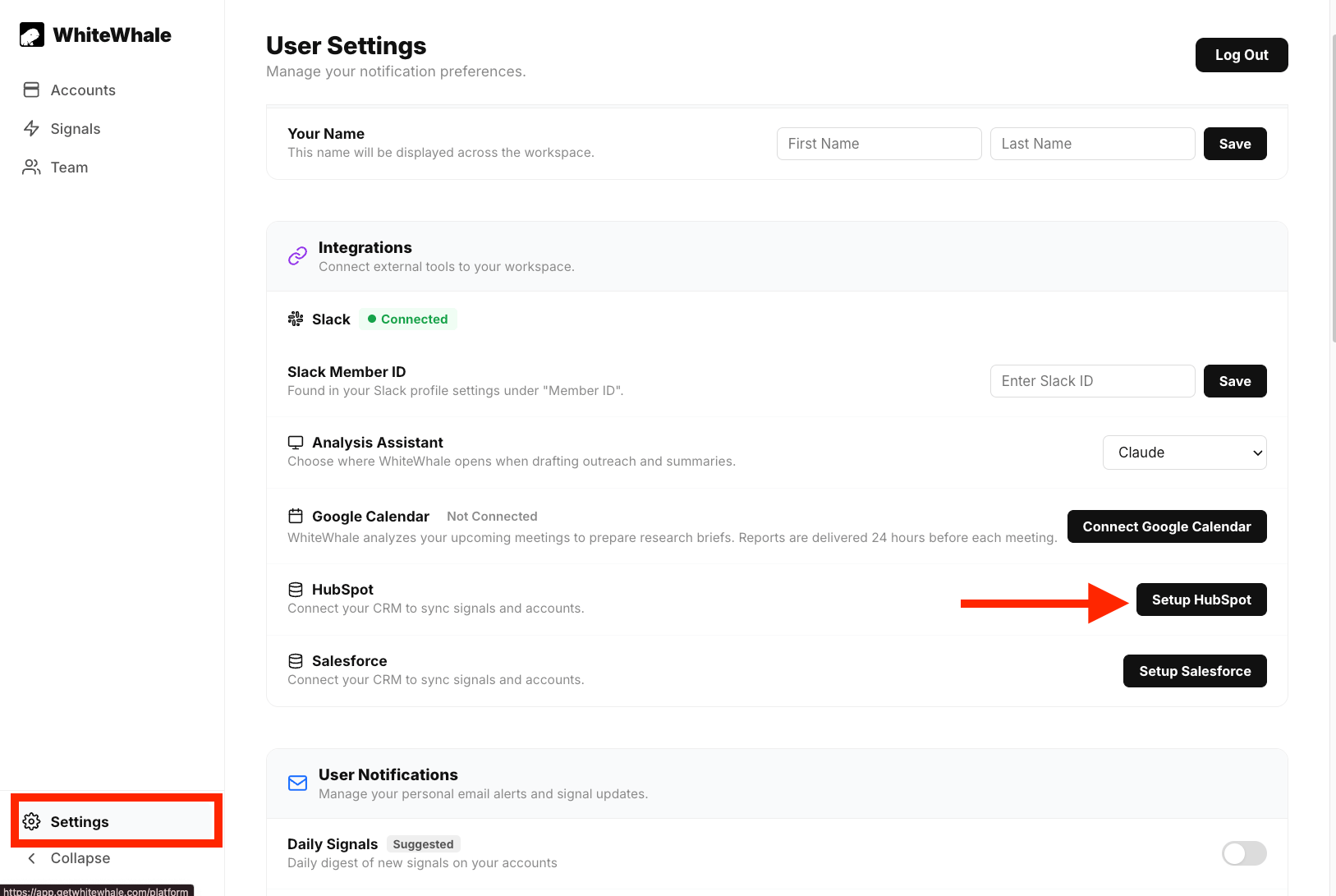
Go to Settings
Click Set Up
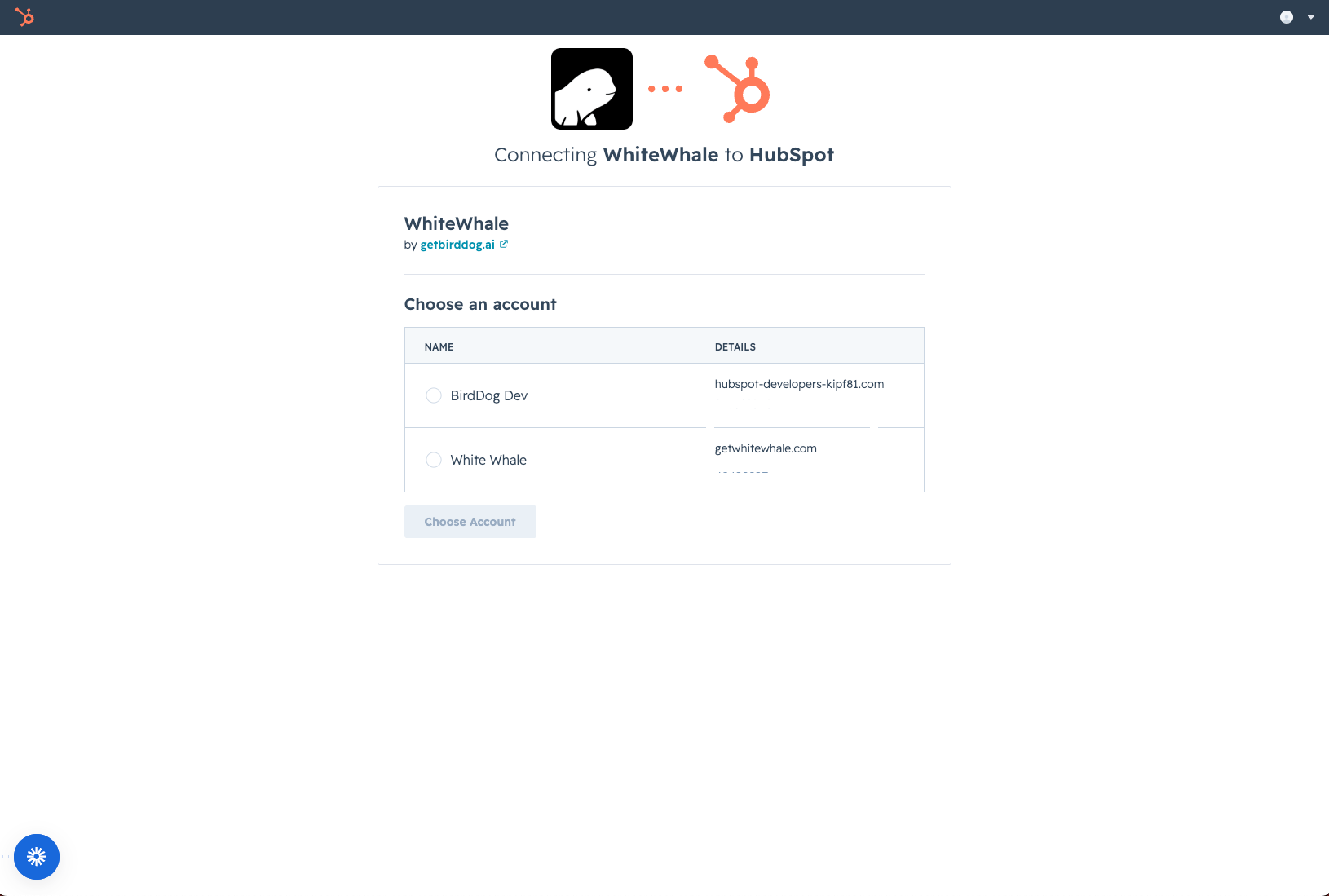
Click Set Up
Choose your setup method
- One-click setup (recommended) — WhiteWhale maps the standard fields automatically. Best for most teams.
- Custom mapping — manually map company and deal fields if you need non-standard field names or a more complex CRM setup.
Create the custom fields in HubSpot
Fields to Create
Fields to Create
Field reference
Company fields
These are the fields WhiteWhale reads from and writes to on your HubSpot company records.Recommended custom field configurations
Create these fields in HubSpot before running setup. All fields should be grouped under Company Information.BirdDog_Description
BirdDog_Description
- Field type: Single-line text
- Label: WhiteWhale Description
- Description: A summary of the most recent WhiteWhale signals for the company
- Default value: Blank
BirdDog_Score
BirdDog_Score
- Field type: Number
- Label: WhiteWhale Score
- Description: A score from 0–100 showing the strength of WhiteWhale signals for this company. Scores above 80 are strong but rare — even a score above 10 likely has valuable information.
- Default value: Blank
BirdDog_Link
BirdDog_Link
- Field type: URL
- Label: WhiteWhale Link
- Description: A link to the full account report in the WhiteWhale platform
- Default value: Blank
BirdDog_Signals
BirdDog_Signals
- Field type: Rich text
- Label: WhiteWhale Signals
- Description: The most recent signals WhiteWhale found on the company
- Default value: Blank
BirdDog_Originated
BirdDog_Originated
- Field type: Single checkbox
- Label: WhiteWhale Originated
- Description: Records if WhiteWhale originated the account
- Default value: Blank
BirdDog_Add_Date
BirdDog_Add_Date
- Field type: Date and time picker
- Label: WhiteWhale Add Date
- Description: Records the date the account was originally added to WhiteWhale
- Default value: Blank
BirdDog_Signal_List
BirdDog_Signal_List
- Field type: Multiple checkboxes
- Label: WhiteWhale Signal List
- Description: List of all WhiteWhale signals that apply to this account
- Option style: Tag (recommended)
- Options: Enter one placeholder option — WhiteWhale will override with the correct values automatically
Deal fields
Mapping your deal pipeline is optional but unlocks two additional capabilities: signal recommendations that adapt based on deal stage, and the ability to backtest which signals correlate most strongly with closed-won deals.Field reference
Company fields
These are the fields WhiteWhale reads from and writes to on your HubSpot company records.Recommended custom field configurations
Create these fields in HubSpot before running setup. All fields should be grouped under Company Information.whitewhale_description
whitewhale_description
- Field type: Single-line text
- Label: WhiteWhale Description
- Description: A summary of the most recent WhiteWhale signals for the company
- Default value: Blank
whitewhale_score
whitewhale_score
- Field type: Number
- Label: WhiteWhale Score
- Description: A score from 0–100 showing the strength of WhiteWhale signals for this company. Scores above 80 are strong but rare — even a score above 10 likely has valuable information.
- Default value: Blank
whitewhale_link
whitewhale_link
- Field type: URL
- Label: WhiteWhale Link
- Description: A link to the full account report in the WhiteWhale platform
- Default value: Blank
whitewhale_signals
whitewhale_signals
- Field type: Rich text
- Label: WhiteWhale Signals
- Description: The most recent signals WhiteWhale found on the company
- Default value: Blank
whitewhale_originated
whitewhale_originated
- Field type: Single checkbox
- Label: WhiteWhale Originated
- Description: Records if WhiteWhale originated the account
- Default value: Blank
whitewhale_add_date
whitewhale_add_date
- Field type: Date and time picker
- Label: WhiteWhale Add Date
- Description: Records the date the account was originally added to WhiteWhale
- Default value: Blank
whitewhale_signal_list
whitewhale_signal_list
- Field type: Multiple checkboxes
- Label: WhiteWhale Signal List
- Description: List of all WhiteWhale signals that apply to this account
- Option style: Tag (recommended)
- Options: Enter one placeholder option — WhiteWhale will override with the correct values automatically
Deal fields
Mapping your deal pipeline is optional but unlocks two additional capabilities: signal recommendations that adapt based on deal stage, and the ability to backtest which signals correlate most strongly with closed-won deals.Create the custom fields in HubSpot
whitewhale_description
whitewhale_description
- Field type: Single-line text
- Label: WhiteWhale Description
- Description: A summary of the most recent WhiteWhale signals for the company
- Default value: Blank
whitewhale_score
whitewhale_score
- Field type: Number
- Label: WhiteWhale Score
- Description: A score from 0–100 showing the strength of WhiteWhale signals for this company. Scores above 80 are strong but rare — even a score above 10 likely has valuable information.
- Default value: Blank
whitewhale_link
whitewhale_link
- Field type: URL
- Label: WhiteWhale Link
- Description: A link to the full account report in the WhiteWhale platform
- Default value: Blank
whitewhale_signals
whitewhale_signals
- Field type: Rich text
- Label: WhiteWhale Signals
- Description: The most recent signals WhiteWhale found on the company
- Default value: Blank
whitewhale_originated
whitewhale_originated
- Field type: Single checkbox
- Label: WhiteWhale Originated
- Description: Records if WhiteWhale originated the account
- Default value: Blank
whitewhale_add_date
whitewhale_add_date
- Field type: Date and time picker
- Label: WhiteWhale Add Date
- Description: Records the date the account was originally added to WhiteWhale
- Default value: Blank
whitewhale_signal_list
whitewhale_signal_list
- Field type: Multiple checkboxes
- Label: WhiteWhale Signal List
- Description: List of all WhiteWhale signals that apply to this account
- Option style: Tag (recommended)
- Options: Enter one placeholder option — WhiteWhale will override with the correct values automatically
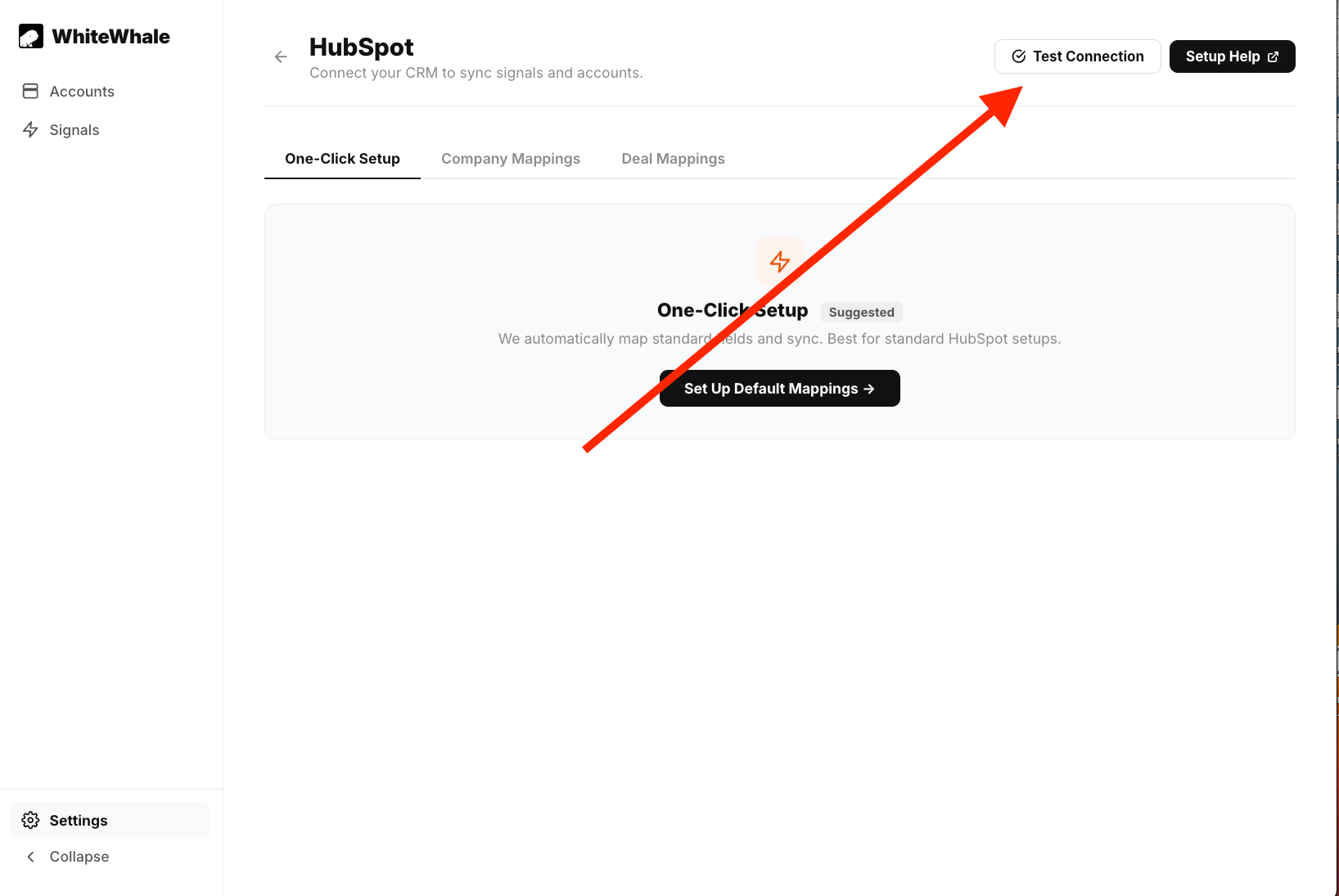
Test the connection
Setting up the HubSpot App Card
Once your field mapping is complete, you can add the WhiteWhale app card to your HubSpot records so reps can see signal data directly inside HubSpot without leaving the CRM.Install from the HubSpot App Marketplace
WhiteWhale on HubSpot Marketplace
Authorize the connection
Authorize WhiteWhale
Add the app card in HubSpot
Field reference
Company fields
These are the fields WhiteWhale reads from and writes to on your HubSpot company records.Recommended custom field configurations
Create these fields in HubSpot before running setup. All fields should be grouped under Company Information.whitewhale_description
whitewhale_description
- Field type: Single-line text
- Label: WhiteWhale Description
- Description: A summary of the most recent WhiteWhale signals for the company
- Default value: Blank
whitewhale_score
whitewhale_score
- Field type: Number
- Label: WhiteWhale Score
- Description: A score from 0–100 showing the strength of WhiteWhale signals for this company. Scores above 80 are strong but rare — even a score above 10 likely has valuable information.
- Default value: Blank
whitewhale_link
whitewhale_link
- Field type: URL
- Label: WhiteWhale Link
- Description: A link to the full account report in the WhiteWhale platform
- Default value: Blank
whitewhale_signals
whitewhale_signals
- Field type: Rich text
- Label: WhiteWhale Signals
- Description: The most recent signals WhiteWhale found on the company
- Default value: Blank
whitewhale_originated
whitewhale_originated
- Field type: Single checkbox
- Label: WhiteWhale Originated
- Description: Records if WhiteWhale originated the account
- Default value: Blank
whitewhale_add_date
whitewhale_add_date
- Field type: Date and time picker
- Label: WhiteWhale Add Date
- Description: Records the date the account was originally added to WhiteWhale
- Default value: Blank
whitewhale_signal_list
whitewhale_signal_list
- Field type: Multiple checkboxes
- Label: WhiteWhale Signal List
- Description: List of all WhiteWhale signals that apply to this account
- Option style: Tag (recommended)
- Options: Enter one placeholder option — WhiteWhale will override with the correct values automatically