Overview

The WhiteWhale API gives you full programmatic access to your account data, signals, users, and Account Suggestions. Common use cases:
  • Pipe WhiteWhale data into tools not covered by native integrations
  • Build your own CRM integration
  • Automate account uploads and status changes
  • Embed WhiteWhale signal data into your own platform or internal tooling
Base URL: https://app.getwhitewhale.com/v1 API Docs: app.getbirddog.lol/api_docs

Authentication

Every request requires two headers:
HeaderDescription
api-keyYour WhiteWhale API key
userThe email address of the user making the request
curl -H "api-key: YOUR_API_KEY" \
     -H "user: you@company.com" \
     https://app.getwhitewhale.com/v1/get_user_data

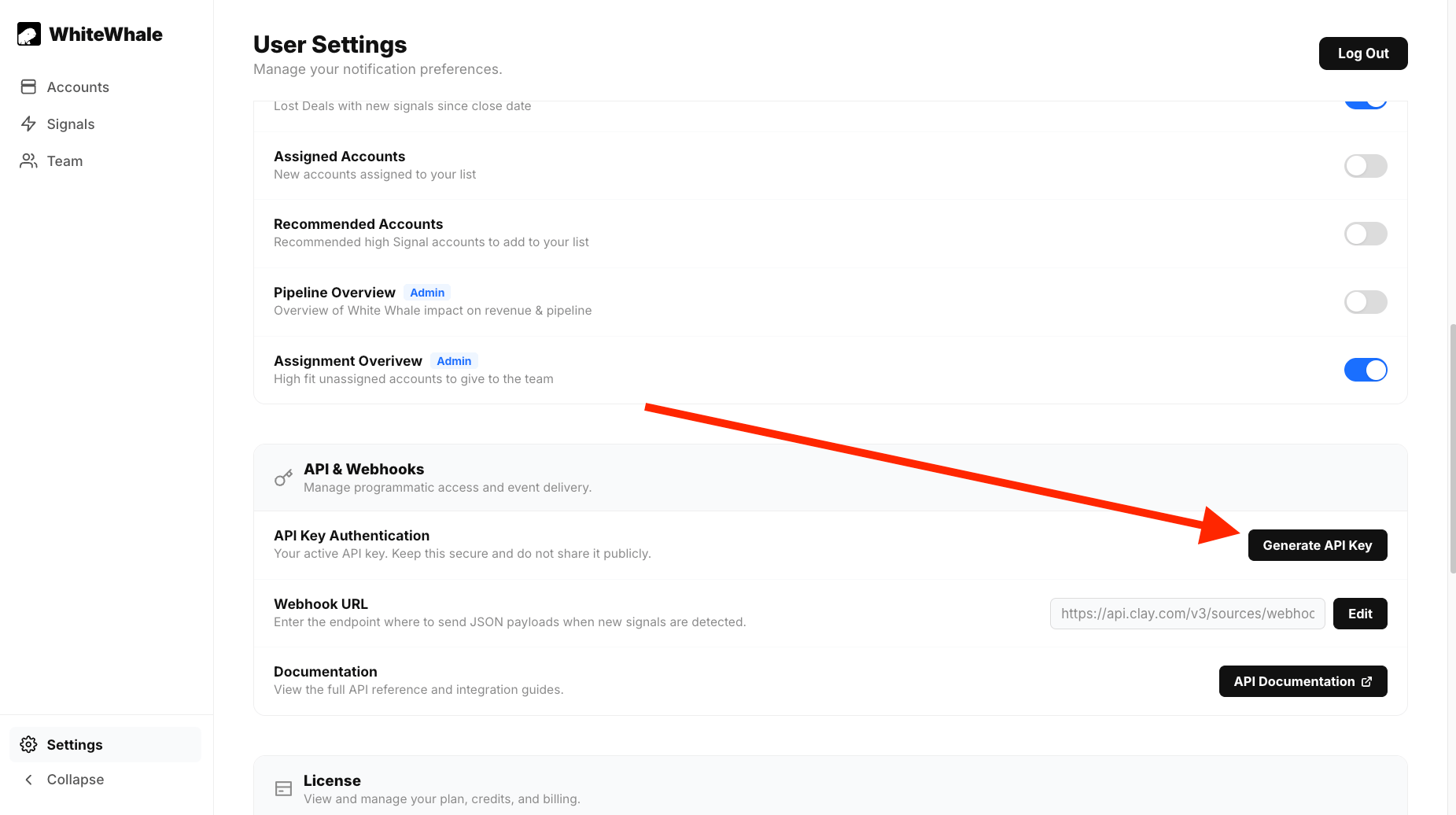
Getting your API key

The API key is shared across your whole team — one key per WhiteWhale instance.
1

Go to Settings

Click Settings in the left nav.
2

Scroll to API & Webhooks

Find the API & Webhooks section — it manages both programmatic access and event delivery.
3

Click Generate API Key

Your active API key will appear. Copy it and store it securely for the team.
Generating Api Key
Keep your API key secure and do not share it publicly or commit it to version control. Anyone with this key has full API access to your WhiteWhale instance.

Rate limits & global errors

Rate limit: 600 requests per minute, global across all routes.
Status codeMeaning
401Authentication failed — API key missing, incorrect, or user not found
404User or resource not found
429Rate limit exceeded

Endpoints

Accounts

Returns WhiteWhale data for your accounts. Filter by specific domains, status, or ICP. Includes signal data and account details.Key parameters:
ParameterTypeDefaultDescription
account_filterarray[]Filter to specific account domains
statusstringallFilter by status: active, archived, farsight, or all
signal_databooleantrueInclude signal data in response
litebooleanfalseReturn lightweight response without full account data
limitinteger100Max accounts to return
offsetinteger0Pagination offset
icp_idstringFilter to a specific ICP
Response: Array of Account objects including name, score, status, signal answers, and account details (LinkedIn URL, industry, employee count, etc.)
Upload one or more accounts by domain. By default, accounts are first sent to Account Suggestions for pre-scoring before being activated.Body:
FieldTypeRequiredDescription
accountsarray of stringsList of account domains to upload
farsightbooleanDefault true — sends to Account Suggestions first. Set to false to add directly as active.
icpstringICP to upload accounts to. Default: Master
If farsight: true (default), uploaded accounts land in Account Suggestions and must be activated. If you have a webhook configured, you’ll receive a pre-score payload when they’re ready. If farsight: false, accounts are immediately active and will consume credits.
Change the status of one or more accounts. Activating accounts consumes credits.Body:
FieldTypeRequiredDescription
accountsarray of stringsAccount domains to update
new_statusstringactive, archive, or delete
icpstringICP to apply changes to. Default: Master
Pass in a list of raw URLs and get back the normalized domains as WhiteWhale will store them. Useful for validating your input before uploading.Body:
FieldTypeRequiredDescription
accountsarray of stringsRaw account URLs to normalize

Signals

Returns the list of signal question formats the platform supports. Use these to validate signal text before adding via the API.Response: Array of Template objects with the question format, a title, whether the template is complete, and examples for templates with placeholders.
{
  "templates": [
    {
      "title": "M&A",
      "question": "Did {account} recently acquire or merge with another company?",
      "complete": true
    },
    {
      "title": "Hiring",
      "question": "Is {account} hiring for <<INSERT POSITION>>?",
      "complete": false,
      "examples": [
        "Is {account} hiring for engineers?",
        "Is {account} hiring for any sales positions?"
      ]
    }
  ]
}
Add one or more signals programmatically. Signals must match a template format from /v1/get_signal_templates, unless ignore_templates: true is set.Body:
FieldTypeRequiredDescription
signalsarrayArray of signal objects (see below)
ignore_templatesbooleanDefault false. Set to true to add custom signals outside the template format.
Each signal object:
FieldTypeRequiredDescription
signalstringThe signal question text
namestringA unique name for the signal within the ICP
icpstringName of the ICP to add the signal to
q_ranknumberSignal rank: 0 (disqualify), 0.1 (low), 1 (normal), 6 (high)
Signal rank behavior:
  • 0 — any account matching this signal is set to an arbitrary negative score. Use to disqualify accounts.
  • 6 — Account Suggestions uses High-ranked signals to find new accounts. At least one signal of rank 6 is required for Account Suggestions to work.
Delete a signal from an ICP by signal ID. Retrieve signal IDs from /v1/get_user_data.Body:
FieldTypeRequiredDescription
signal_idstringUUID of the signal to delete

Users

Returns signals, ICPs, remaining credits, and active account count for the authenticated user.Response: UserOverview object with:
  • icps — list of ICP names
  • icp_id_dict — map of ICP name → ICP ID
  • signals — all signals across the user’s ICPs
  • credits_remaining — remaining account credits
  • active_accounts — current active account count
Returns an array of UserOverview objects for every user in your WhiteWhale instance. Requires admin authentication.
Programmatically invite a new user to your WhiteWhale instance.Body:
FieldTypeRequiredDescription
emailstringEmail address for the new user. Stored entirely lowercase.
email_alertsbooleanDefault false. Set to true to enable email alerts for this user.
Errors: 403 if out of user seats. 409 if a user with that email already exists.
Remove a user from your instance. Requires the authenticating user to be an admin.Body:
FieldTypeRequiredDescription
emailstringEmail of the user to delete
Errors: 403 if the user is not in your organization.

Account Suggestions (ICP)

Returns details for one or all ICPs in your instance, including signals, Account Suggestions mode, and constraints.Parameters:
ParameterTypeDescription
icp_idsarrayOptional. ICP IDs to fetch. If omitted, returns all ICPs in your instance.
Creates a new ICP as a child of your Master ICP. The new ICP inherits the Master ICP’s signals.Body:
FieldTypeRequiredDescription
icp_namestringName for the new ICP. Must be unique.
Errors: 400 if an ICP with that name already exists.
Switches one or more accounts to a different ICP.Body:
FieldTypeRequiredDescription
accountsarrayAccount domains to move
target_icpstringName of the ICP to move them to
This operation can take as long as adding a new account. Plan accordingly for large batches.
Deletes an ICP and all its associated accounts and signals. Cannot be used to delete a Master ICP.Body:
FieldTypeRequiredDescription
icp_idstringUUID of the ICP to delete
Errors: 400 if ICP not found for user. 403 if attempting to delete a Master ICP.
Activates or deactivates Account Suggestions for an ICP.Body:
FieldTypeDescription
icp_idstringICP to update
statestring"false" (off), "limited" (only scans uploaded accounts), or "unlimited" (scans the full internet within your constraints)
At least one signal of rank 6 (High) is required for Account Suggestions to find new accounts. Account Suggestions runs automatically at 3:00 UTC daily. To trigger immediately, use /v1/icp/run_farsight.
Triggers an immediate Account Suggestions run for the specified ICP. Can only be called once every 2 hours.Body:
FieldTypeRequiredDescription
icp_idstringICP to run Account Suggestions for
Update the geography and industry constraints for Account Suggestions. Filters take effect immediately and will reject any queued accounts that fall outside the new parameters.Body:
FieldTypeRequiredDescription
icp_idstringICP to update
filter_listarrayList of countries, states, or industries to apply
inclusion_or_exclusionstring"inclusion" or "exclusion"
list_typestring"country", "state", or "industry"
Use ISO 3166-1 alpha-2 codes for countries, two-digit codes for US states. Retrieve valid codes from /v1/utilities/location_codes and valid industries from /v1/utilities/industries.
Sets minimum and maximum employee count for Account Suggestions. Accounts outside this range are automatically rejected.Body:
FieldTypeRequiredDescription
icp_idstringICP to update
minintegerMinimum employee count. Default: 0
maxintegerMaximum employee count. Default: 0

Webhook

Sets the webhook endpoint for your account. WhiteWhale will POST signal and account events to this URL automatically.Body:
FieldTypeRequiredDescription
webhook_urlstringThe URL WhiteWhale should send events to
See the Webhooks page for full payload documentation.
Sends a test payload to your registered webhook endpoint and returns the payload in the response so you can inspect it.Body:
FieldTypeRequiredDescription
event_typestring"account.upload" or "account.signal"
spoof_payloadbooleanReturns a fake payload with the correct data structure. Requires at least one signal on an account.
icp_namestringIf provided, returns a real signal and account name instead of spoofed data.
The payload returned via this route is unsigned. The actual test payload delivered to your webhook endpoint will be signed.

Utilities

Returns a dictionary of valid country and state codes accepted by the API. Use these when setting Account Suggestions geography constraints.
Returns all valid industry strings accepted by the API. Maps to LinkedIn’s industry taxonomy.

Webhooks

Full payload reference and setup guide for WhiteWhale webhook events.

Clay

Connect WhiteWhale to Clay via webhook or CSV export.

HubSpot

Native HubSpot integration for CRM sync.

Salesforce

Native Salesforce integration for CRM sync.